I’ve had my eye on vLLM for a while, so I finally ran it on my own laptop and measured everything I could. vLLM turns one model into a server that many people can use at once.
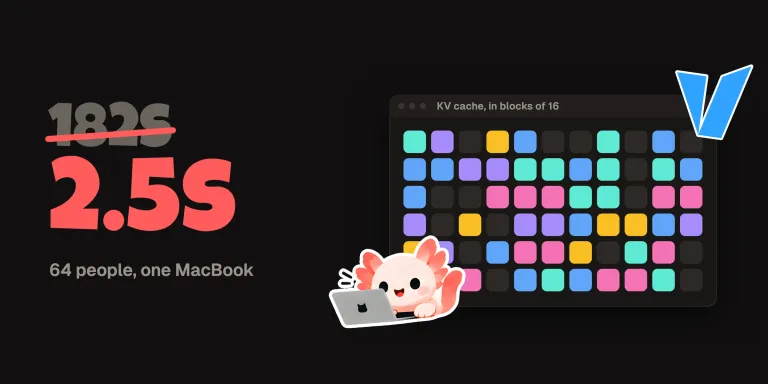
Sixty-four people asked my laptop for a short story at the same time. With a plain loop, the last person waited 182 seconds before they saw a single word. With vLLM, the last person waited 2.5 seconds.
Same laptop, same model, same math. The only difference is how vLLM handles memory. Most of vLLM’s speed is bookkeeping, and the rest of this piece is me showing you where that bookkeeping happens.
Everything here ran on my MacBook Pro (M4 Pro, 24 GB). The server is vllm-metal, the vLLM project’s community plugin for Apple silicon, and the model is Qwen2.5 7B Instruct. I used a version compressed to 4 bits.
Okay now, let’s dive in.
One person gains nothing
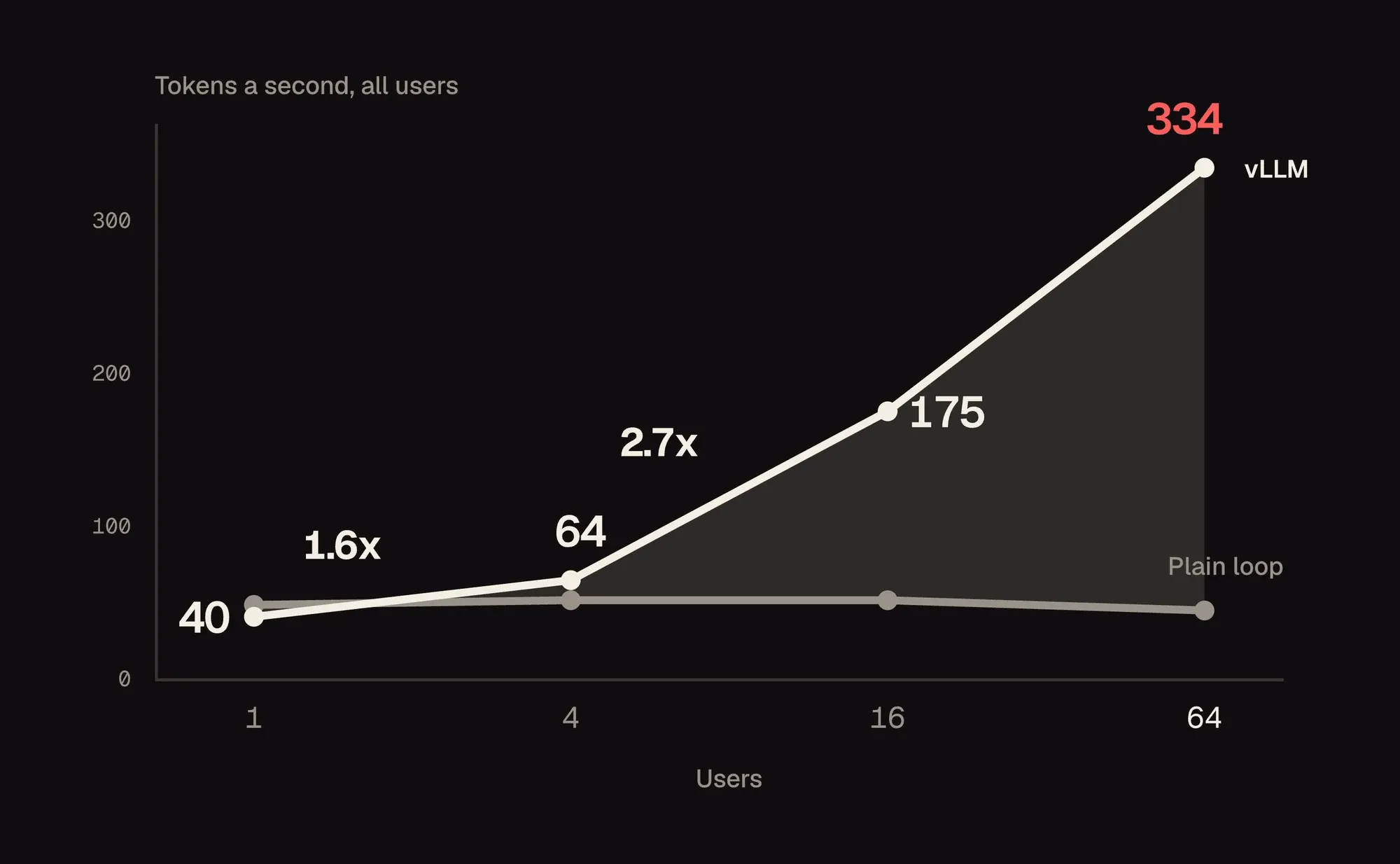
I started with the boring case. With one user, vLLM was a little slower than a plain MLX loop, about 40 tokens a second against 48.
That surprised me at first, but it makes sense. vLLM’s whole advantage is sharing, and one person has nothing to share. If it’s just you chatting with a local model, a simple app is fine.
At sixty-four users the picture flips. The plain loop answers one person at a time and took 184 seconds to get through everyone. vLLM took 24.5.
The memory that fills up
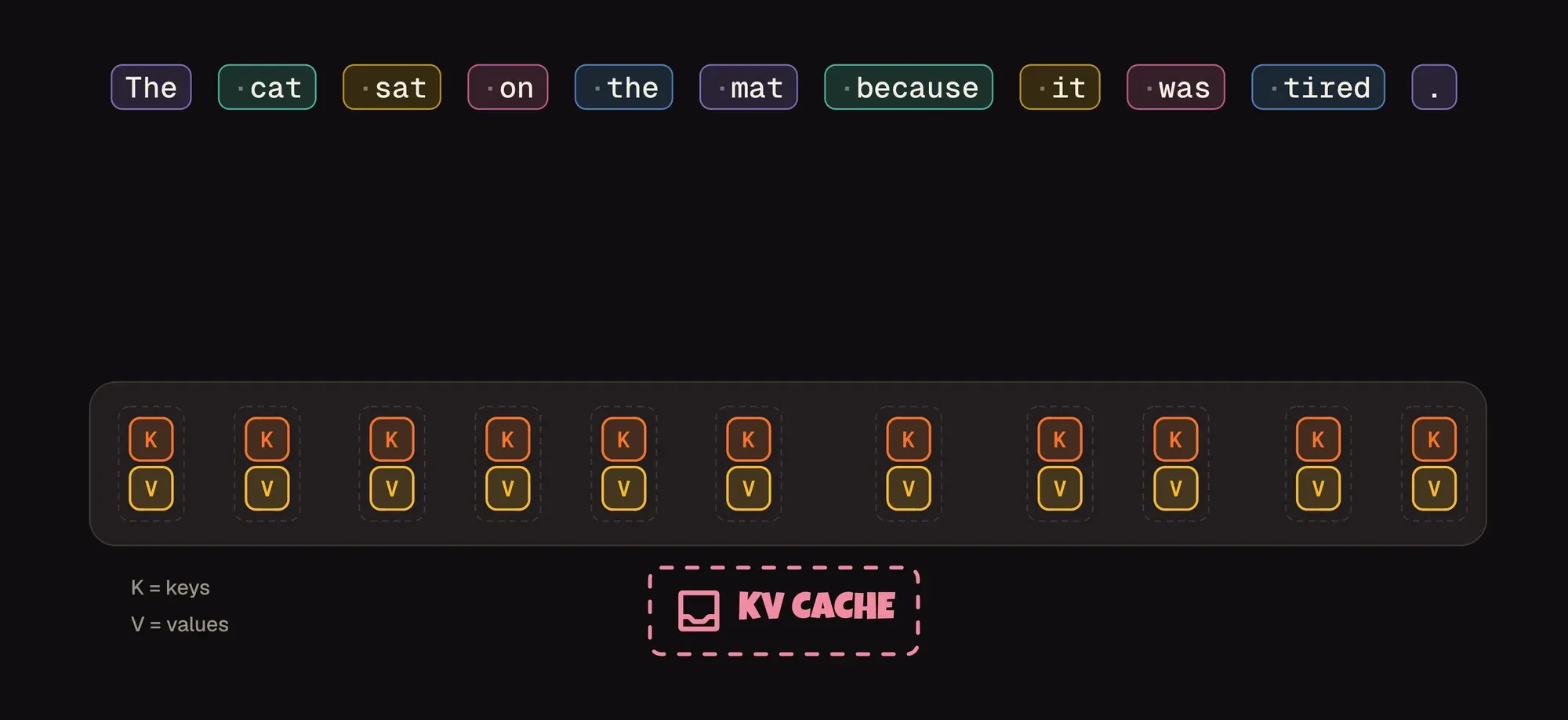
To see why, you need one idea from inside the model. Every new word looks back at every earlier word to decide what matters. To do that quickly, the model keeps a key and a value for each token it has already read (a token is a word or a piece of one), and those never change. That store is the KV cache.
For this model the cache costs 57,344 bytes for every token. A 32,000-token conversation needs 1.84 GB on its own, and every person using the server has their own.
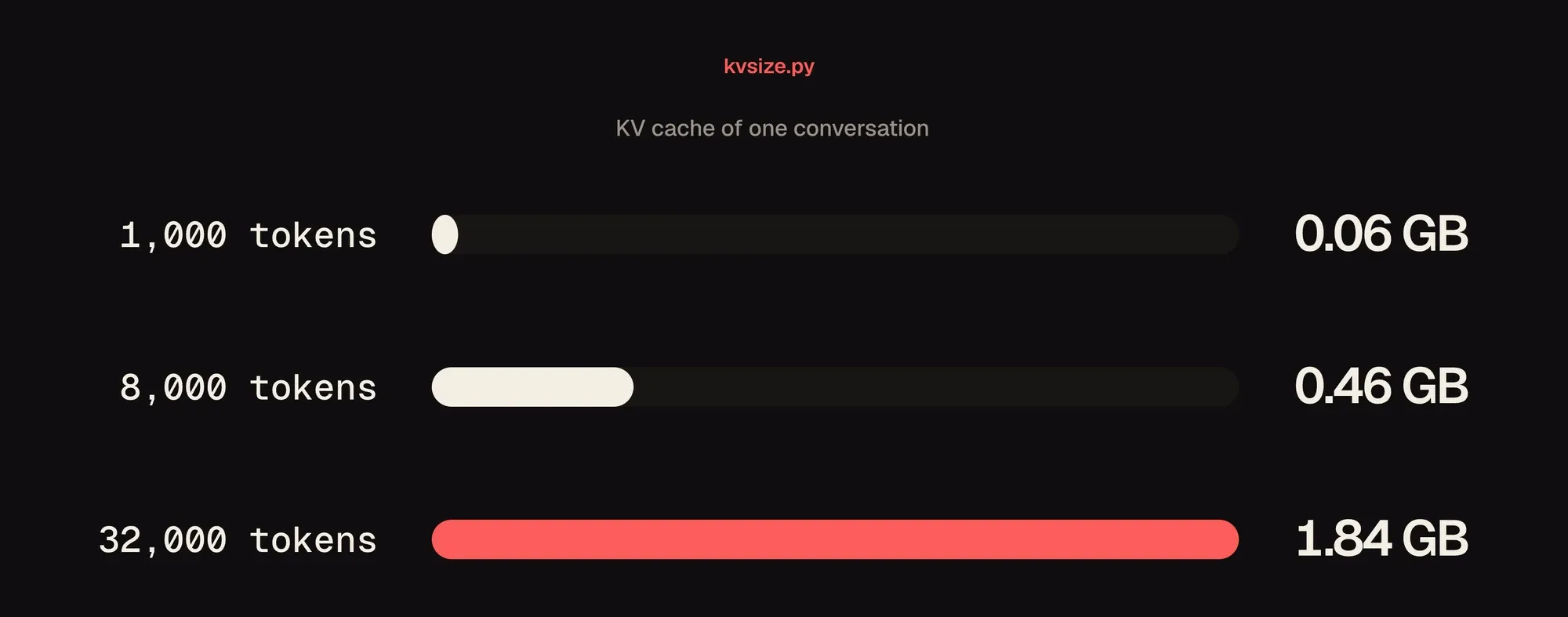
So the cache, not the weights, decides how many people fit on the machine.
Reserve less, fit more
Older servers didn’t know how long an answer would be. So when a request came in, they reserved room for the longest possible answer, all of it, in one piece.
I wanted real lengths, so I sent vLLM 64 different requests and let every answer stop when it wanted to. A one-word answer took 2 tokens. Some of the beginner’s guides ran all the way to the 1,024-token limit I set.
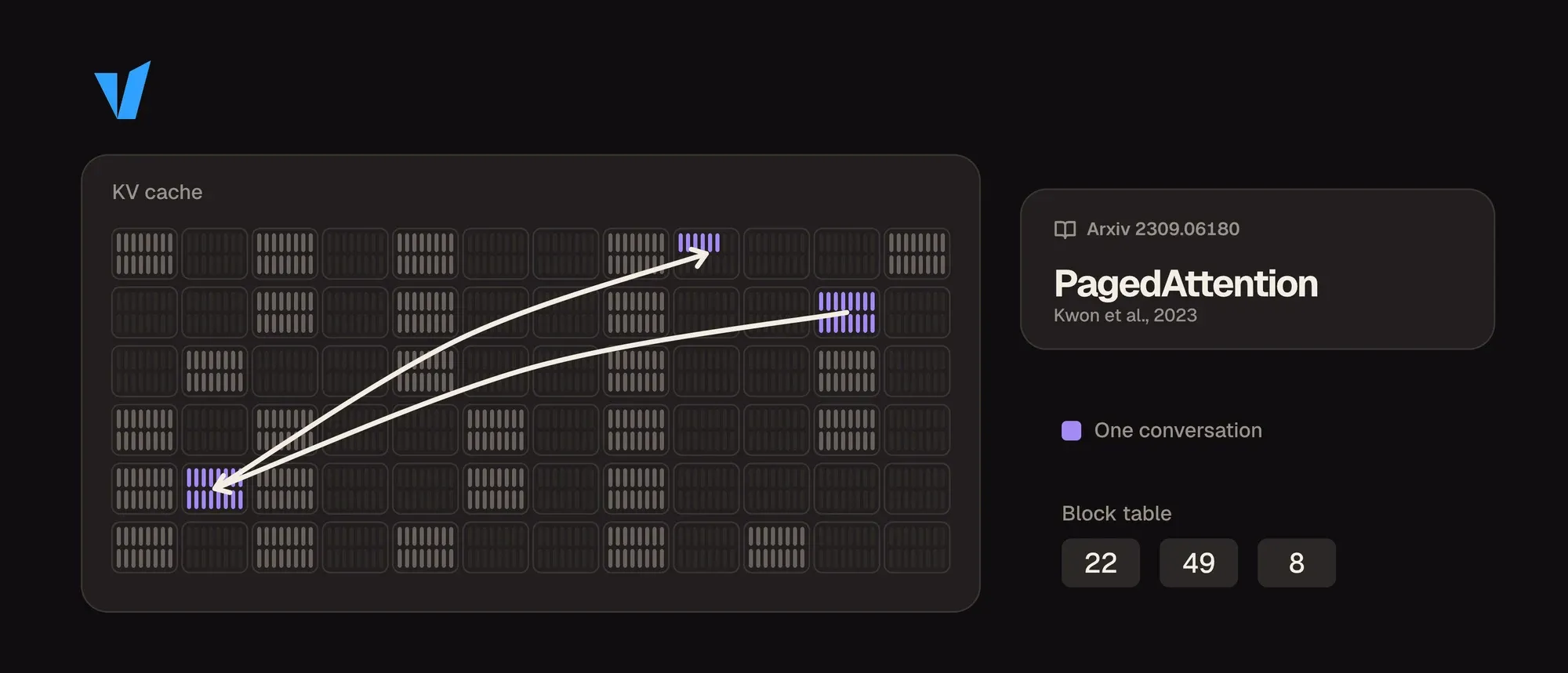
Then I replayed those lengths through a tiny paging allocator I wrote, about fifteen lines of Python. It keeps a list of free blocks and a table for each request, and hands out a new 16-token block only when the last one fills.
Reserving the maximum wasted 67.9% of the memory. Blocks of 16 wasted 2.3%. My cache held 31,024 tokens. In that space, 29 requests fit the old way and 88 fit with paging.
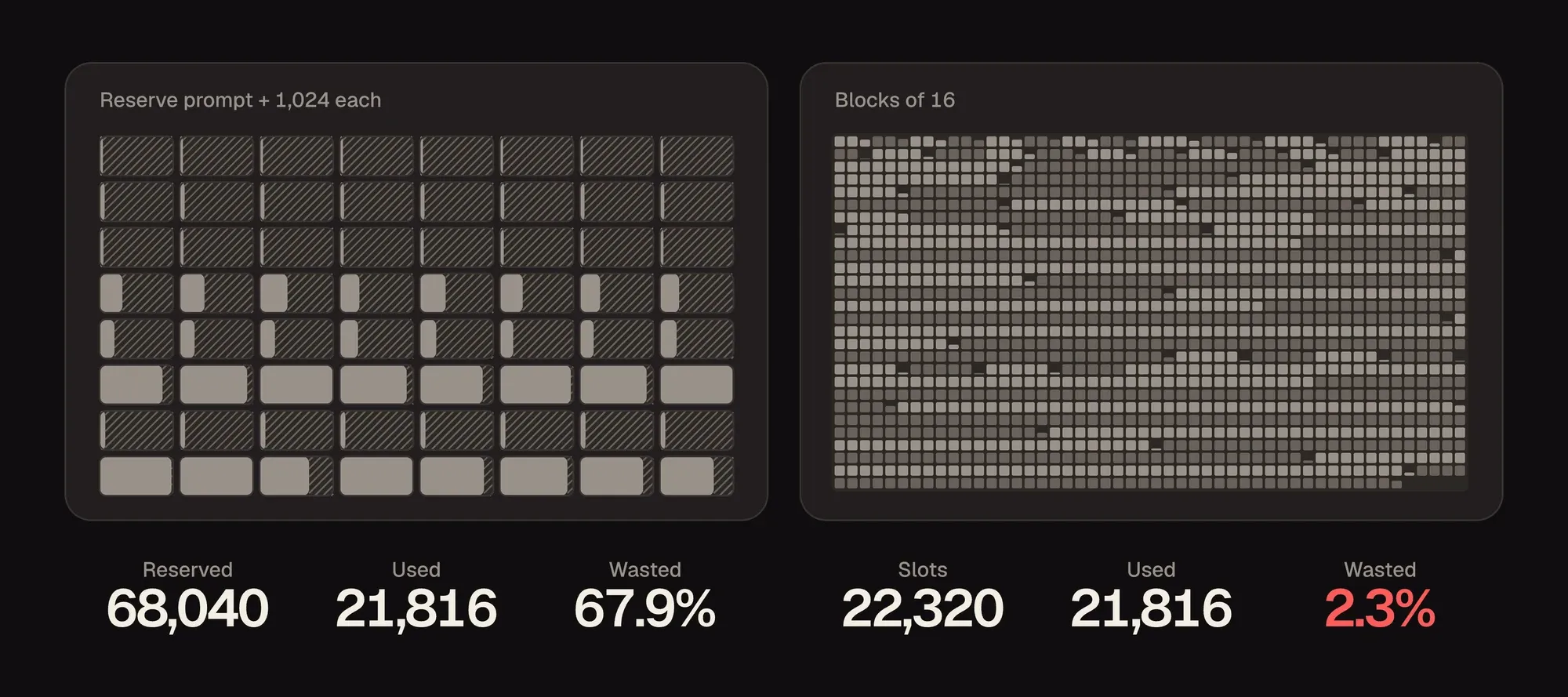
That is PagedAttention, the idea vLLM was built on. The blocks don’t have to sit next to each other, the table is enough to find them.
The cache remembers the start
Blocks have a second payoff. If two requests start with the same text, they can share the same blocks.
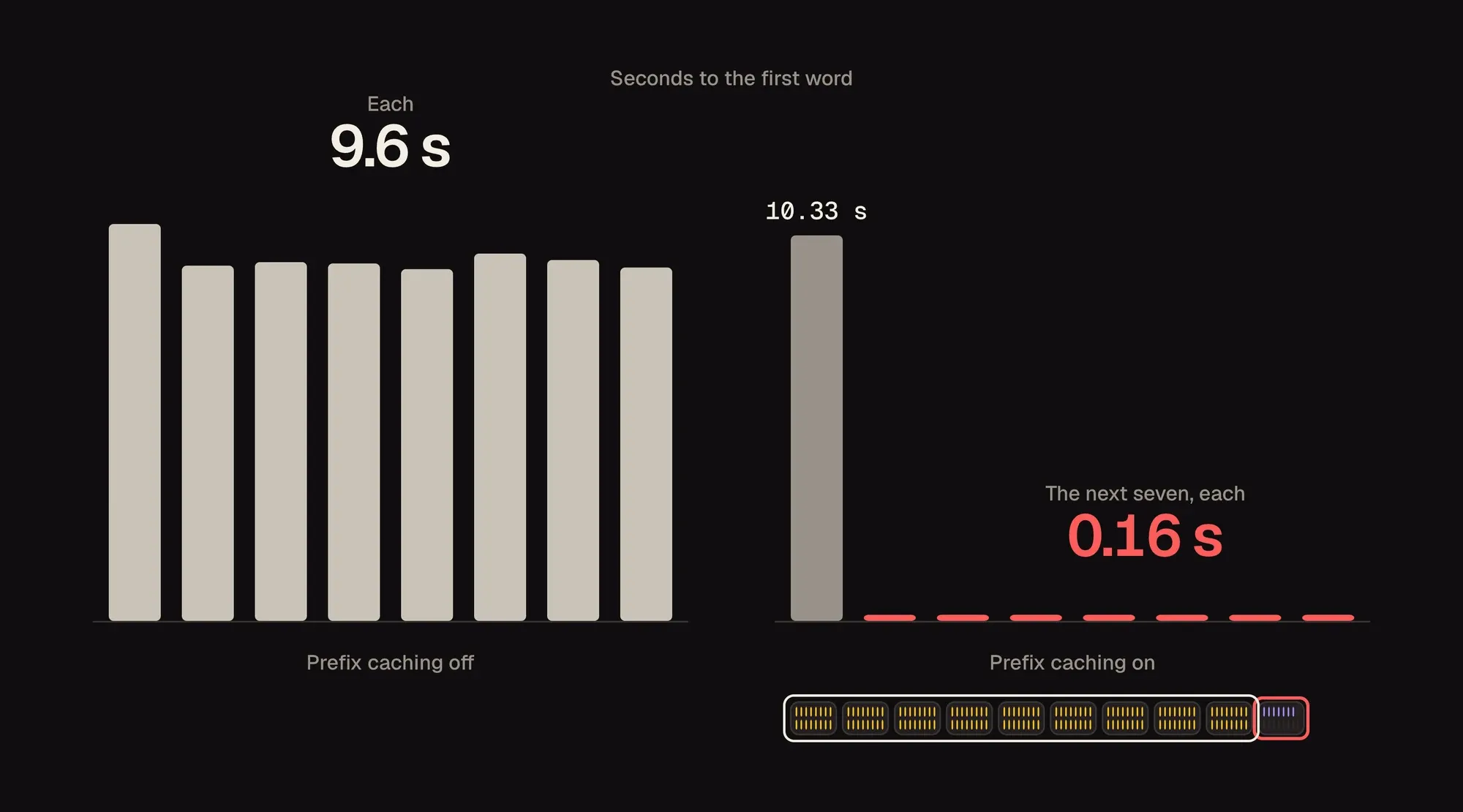
I gave vLLM a 3,783-token document and asked 8 questions about it, one after another. The first question took 10.33 seconds to its first word. The next seven took 0.16 seconds each. With prefix caching turned off, every single question took about 9.6 seconds.
Then I tried something closer to a real app. Sixteen people ask about the same document at the same time, each with a different question. With prefix caching off, the whole thing took 175.6 seconds and the last person waited almost three minutes for a first word. With it on, the whole thing took 9 seconds. Nobody waited more than 1.27 seconds.
To be fair about it, one request had already read the document before the sixteen arrived. That is what a real app looks like after its very first user.
If you build on top of this, put the part that stays the same at the start of your prompt and the part that changes at the end, because the cache can only reuse a shared start.
Long prompts freeze everyone
Reading a prompt is the heavy part. Writing the next token is light. That mix causes a problem you can feel.
I had 16 people chatting, getting a new token about every 0.09 seconds. Then a 3,783-token prompt showed up. With chunked prefill off, everyone froze for 11.56 seconds while vLLM read it.
Chunked prefill reads the long prompt in pieces and fits everyone else’s next token into each step. With the default step of 2,048 tokens, the worst freeze dropped to 4.90 seconds. With 512-token steps it dropped to 1.75.
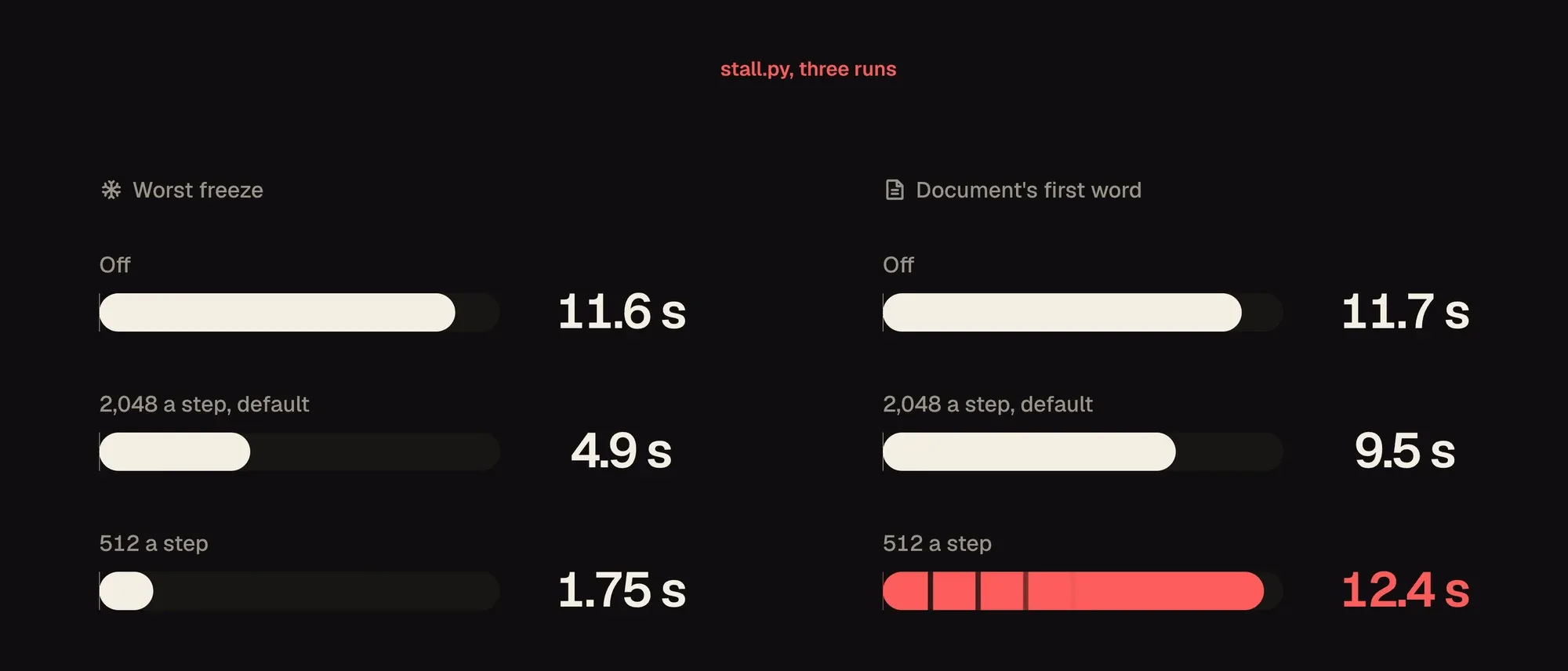
There is a price. With small steps, the long prompt itself waited 12.37 seconds for its first word instead of 9.51. The setting is --max-num-batched-tokens, and it trades the chatters’ smoothness against the big request’s wait.
When memory runs out
I wanted to see what happens when the cache is too small, so I pinned it to 300 blocks with --num-gpu-blocks-override and sent 64 users at once.
vLLM let all 64 in. About 12 seconds later the cache hit 100%, and it started preempting. On this build, preemption means the newest request loses its blocks and its work is thrown away and redone later. That happened 73 times, and the run took 138.7 seconds. With a roomy cache, the same run took 49.6 seconds with zero preemptions.
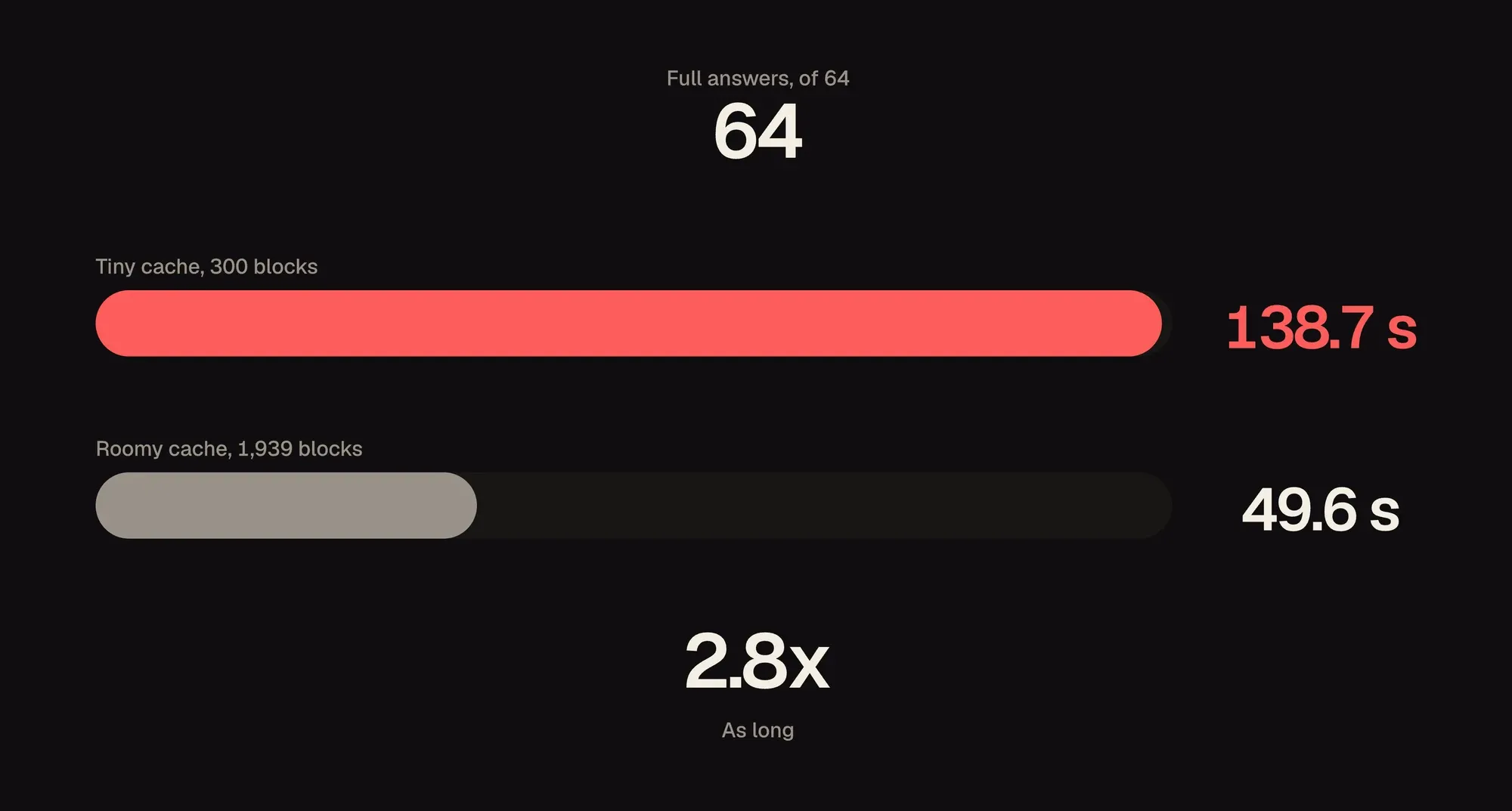
My first try used 200 blocks, and vLLM refused to start. That is only 3,200 tokens, and I had told it to accept conversations up to 4,096. It won’t start a server that can’t hold even one of those. Nothing breaks when memory runs out. Things just slow down, and the preemption count on the /metrics page tells you it’s happening.
The thing that fooled me
I also pulled the real attention weights out of the model, to show attention on something real instead of a drawing.
My test sentence was “The cat sat on the mat because it was tired.” Layer 14, head 5 put all of the word “it“‘s attention on “cat”. I was super elated. Then I noticed 448 of the 784 heads put more than half on “cat”, which was too good.
So I tried five more sentences with the noun further in. That head put everything on the very first word, every time. It wasn’t tracking “it” at all. It was an attention sink, a known habit where heads dump their attention on the first token when they have nothing better to do (Xiao et al., 2023).
The head that actually picked the right noun over the wrong one in all five sentences was layer 17, head 24. One example fooled me and five didn’t, and I kept that whole detour in the video because it’s the most honest part of it.
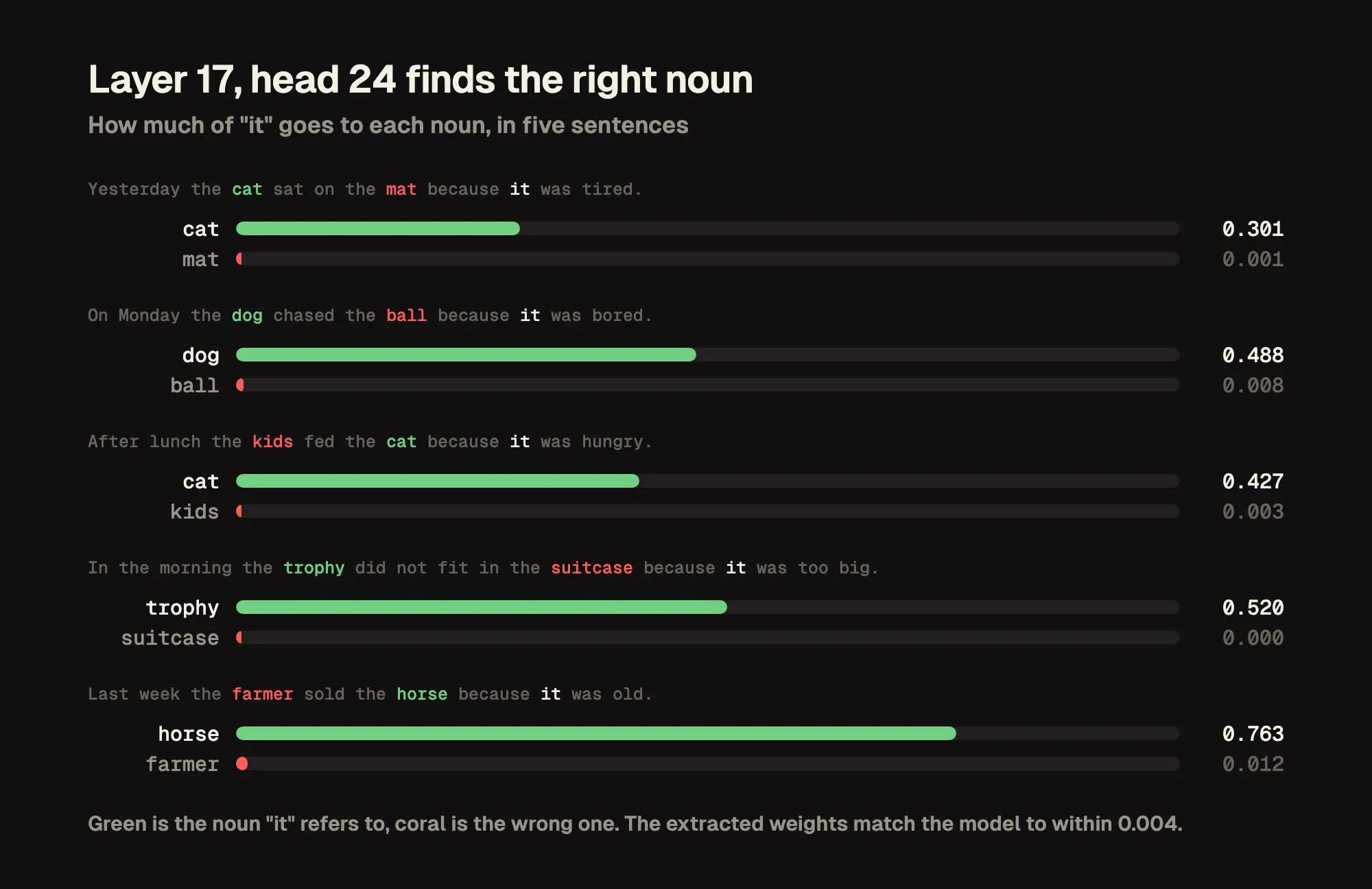
What surprised me on a Mac
A few things you should know before you try this yourself.
- The cache came out a different size almost every time I started the server, from 29,968 to 104,272 tokens with the same memory setting. vLLM takes what memory is free at that moment. Close heavy apps, read the startup log every time, and pin the cache size when you compare settings.
- The first start took almost seven minutes, mostly the model download. Every start after that took 14 to 17 seconds.
- The concurrency number in the log is a worst case. It assumes every conversation runs to the full length, and paging means short chats never pay for that.
- On Metal, paged attention is still marked experimental. The battle-tested version runs on Linux with NVIDIA cards.
Where this leaves me
The model does the same math with or without vLLM. What vLLM changes is the bookkeeping. It cuts the cache into small blocks so almost nothing is wasted, which fits more conversations, which lets it keep the chip busy with all of them at once.
I’m still learning a lot here and I will share some more as I go. If there’s a part of the stack you want me to take apart next, tell me. Till next time, thanks for reading.
The full video, with every one of these runs animated, is on YouTube.